Storybrooke Script: A Playful Font with Serious Style
Looking for a font that brings charm, whimsy, and personality to your design projects? Storybrooke Script might just be the perfect choice. As the sister font of Storybrooke, it shares the same playful spirit but offers a slightly different flair. Whether you're crafting social media posts, branding materials, or digital content, Storybrooke Script can add a touch of fun without sacrificing professionalism.
But like any font, Storybrooke Script comes with its own set of considerations. Choosing the right font isn't just about aesthetics—it's also about usability, compatibility, and how well it fits your overall design goals. In this article, we'll explore what makes Storybrooke Script unique, highlight common mistakes people make when using it, and provide practical advice on how to use it effectively in your projects.
What Is Storybrooke Script?
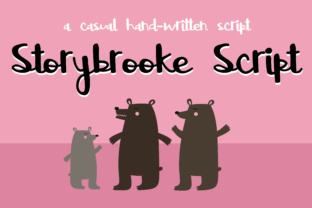
Storybrooke Script is a stylized script font designed to evoke a sense of storytelling and creativity. It's part of the Storybrooke family of fonts, which includes both a regular and a script variant. The script version adds a more fluid, handwritten feel, making it ideal for headings, logos, and other visual elements where a personal touch is desired.
Its cursive style and gentle curves give it an approachable yet elegant appearance, making it a popular choice among designers, bloggers, and small business owners looking to stand out in a sea of generic sans-serif fonts.
Why People Love Storybrooke Script
Storybrooke Script appeals to a wide range of users because of its versatility and charm. Here are a few reasons why it has become a favorite:
- Playful yet professional: It strikes the perfect balance between fun and sophistication, making it suitable for both casual and formal contexts.
- Great for branding: Its unique look helps businesses create memorable identities, especially in industries like fashion, entertainment, and lifestyle.
- Easy to read: Despite being a script font, it remains legible even at smaller sizes, which is essential for web and print use.
- Complements other fonts: When paired with the standard Storybrooke font, it creates a cohesive and visually appealing design.
Common Mistakes When Using Storybrooke Script
While Storybrooke Script is a fantastic font, it’s easy to misuse it if you’re not careful. Here are some common pitfalls to avoid:
1. Overusing It in Long Text
One of the biggest mistakes is using Storybrooke Script for large blocks of text. Script fonts are generally harder to read in long paragraphs, especially on screens. This can lead to poor user experience and lower engagement.
Better Approach: Reserve Storybrooke Script for short phrases, headlines, or call-to-action buttons. For body text, stick to a clean, readable font like Arial or Helvetica.
2. Ignoring Font Pairing
Many users apply Storybrooke Script in isolation, which can make designs feel unbalanced or cluttered. Without proper pairing, the font may not harmonize well with other elements in your layout.
Better Approach: Pair Storybrooke Script with a complementary sans-serif or serif font. For example, using it alongside a modern sans-serif like Lato or Montserrat can create a nice contrast while maintaining readability.
3. Not Checking Licensing Terms
Another frequent error is assuming that Storybrooke Script is free to use in all contexts. While it may be available for personal use, commercial applications often require a license.
Better Approach: Always review the licensing agreement before using the font in a project that involves client work, publishing, or selling products. If unsure, purchase a commercial license to avoid legal issues later.
4. Neglecting Readability on Mobile Devices
Script fonts can appear too decorative or cramped on mobile screens, especially when scaled down. This can affect how your content is perceived by users accessing your site on phones or tablets.
Better Approach: Test your design on multiple devices and ensure that Storybrooke Script remains legible across all screen sizes. Consider using a responsive font size and spacing strategy to maintain clarity.
How to Use Storybrooke Script Effectively
To get the most out of Storybrooke Script, follow these best practices:
- Use It Sparingly: Apply it to key elements such as headers, logos, and titles. Avoid using it for extended text unless absolutely necessary.
- Pair It Wisely: Combine it with a contrasting font to create visual interest without overwhelming the reader.
- Check Licensing: Ensure you have the appropriate rights to use the font in your intended context, especially for commercial purposes.
- Test Across Devices: Preview your design on desktops, laptops, tablets, and smartphones to ensure consistent readability and appearance.
Final Tips for Choosing Storybrooke Script
Before committing to Storybrooke Script, take a moment to evaluate whether it aligns with your project's needs. Ask yourself the following questions:
- Does the font match my brand’s tone and personality?
- Will it be used in a way that enhances, rather than distracts from, the message?
- Is it compatible with the platforms and tools I'm using?
- Am I aware of the licensing requirements for my intended use?
By considering these factors, you’ll be better equipped to make an informed decision and avoid common mistakes that could compromise your design’s effectiveness.
Storybrooke Script is a powerful tool when used correctly. With the right approach, it can elevate your projects and leave a lasting impression on your audience. Just remember to use it wisely, pair it thoughtfully, and always prioritize readability and accessibility.